Parameter Maintenance
Initial (Main Search) Screen
-
SignOn to the Back Office.
-
From the Configuration Management menu, select Parameter Maintenance.
-
If you have visibility to all stores, Parameter Maintenance modifies parameters for all stores at once.

Screenshot of the Parameter Maintenance application.
- If you have visibility to a single store only, Parameter Maintenance modifies parameters for that single store.

Screenshot of the Parameter Maintenance application.
- If you have visibility to multiple stores (but not all stores), the user must first select a single store.
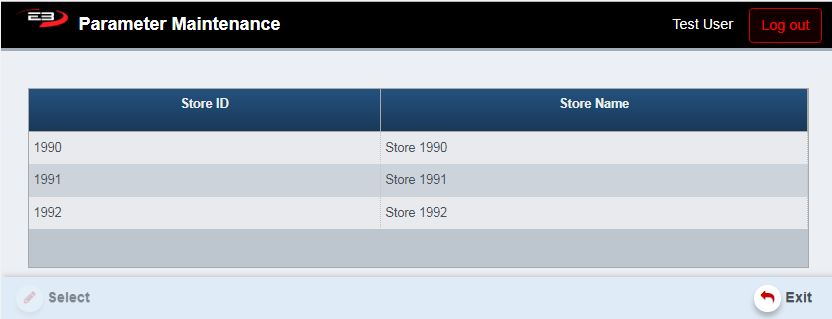
Screenshot of the Parameter Maintenance application.
-
Highlight a single store from the list provided, the Select button becomes enabled.
-
Click the Select button to pick the store whose parameters will be modified.
-
Once the store selection is complete (either by default or by user selection), modification may begin.
Parameter Modification
-
Which parameters are visible and can be modified is determined by the user’s security level.
-
Parameters are grouped by which area of the system is affected by that particular parameter.
-
Parameter groups are as follows:
-
POS LOGON
-
SECURITY
-
EOD
-
POS MISC XAPP
-
DISCOUNTS
-
TENDER
-
SYS CONFIG
-
GIFT CARD
-
ITEM PRICING
-
TILL MGMT
-
POS VOIDS
-
POS EOT
-
POS TAX
-
INVENTORY
-
RETURNS
-
CUSTOMER
-
BACK OFFICE MISC
-
-
Parameter groups are displayed at the top of the screen as tabs

Screenshot of the Parameter Maintenance application.
-
Click on the tab at the top of the screen to go to that parameter group
-
Current values are shown for each parameter, for example:
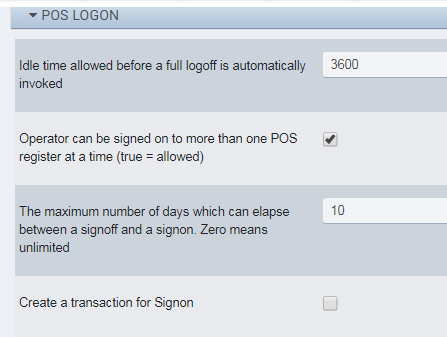
Screenshot of the Parameter Maintenance application.
- The following subsections list each tab, describe the parameters, and provide some examples
POS LOGON
This tab contains parameters that are used with logging onto or off from the POS, for example:
-
Enable Clock In/Out
-
Employee Shift Minutes
SECURITY
This tab contains parameters related to security and passwords, for example:
-
Number of POS login retries allowed. -1 means no limit
-
Minimum allowed pasword length
EOD
This tab contains parameters related to the End-Of-Day process, for example:
-
Force Close Time (e.g. HH:MM)
-
Time after midnight to start using the next day as business date (e.g. HH:MM)
POS MISC
This tab contains miscellaneous parameters related to POS operation, for example:
-
Reason Code for Price Match Price Override
-
Default Maximum amount for a transaction
XAPP
This section contains parameters related to running Xapps, for example:
-
Enable/disable optional auto-add feature of mandatory Xapp
-
Enable/disable optional select feature of mandatory Xapp
DISCOUNTS
This section contains parameters related to discounts, for example:
- Seniority in days that an employee must have to become eligible to receive employee discount
TENDER
This section contains parameters related to tendering, for example:
-
Minimum amount required for signature when card is swiped
-
Define whether PIN bypass is allowed for Online PIN CVM
SYS CONFIG
This section contains parameters related to general system configuration, for example:
-
Maximum minutes allowed for PostVoid
-
Generic Timer 1 (ms)
GIFT CARD
This section contains parameters related to gift cards, for example:
-
Minimum Gift Card Issue Amount
-
Add this item for a gift card cashout
ITEM PRICING
This section contains parameters related to item pricing and overrides, for example:
-
Allow Override price for item to be Zero
-
Default Maximum amount for an individual item
TILL MGMT
This section contains parameters related to Till usage, for example:
-
Default opening cash balance
-
Manager approval required for Paid In
POS VOIDS
This section contains parameters related to voiding transactions, for example:
- Enable Prompt for Post Void reason free form text.
POS EOT
This section contains parameters related to End-Of-Transaction, for example:
-
Controls if signature pad prompting for a donation amount should appear when TOTAL is selected
-
Maximum allowed number of last transaction receipt reprints
POS TAX
This section contains parameters related to taxation, for example:
-
Auto-apply customer tax exempt
-
Parameter for TAX Adjustment DAYS
INVENTORY
This section contains parameters related to inventory control, for example:
- WAIVE RESTOCKING FEE Parameter
RETURNS
This section contains parameters related to returns, for example:
-
Grace period days for the Return Policy
-
Allow Manual Returns
CUSTOMER
This section contains parameters related to customers, for example:
-
Operator prompt for Customer Opt-In Terms and Conditions Xapp
-
Terms and Conditions Text for Customer Opt-In
BACK OFFICE MISC
This section contains parameters related to miscellaneous Back Office functionality, for example:
- Item Maintenance Config File