Replicate Store Items
Initial Screen
-
SignOn to the BackOffice.
-
From the Item Pricing / Data Management menu, select Replicate Store Items.
-
An initial screen like the one shown below should appear.
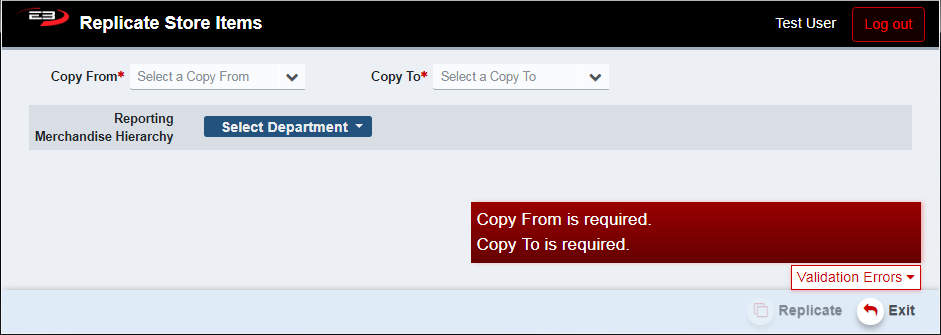
Screenshot of the Replicate Store Items application.
-
Select the Copy From store from which the items will be copied (source store).
-
Select the Copy To store to which the items will be copied (destination store).
-
The Copy To store must be different than the Copy From store.
-
You can optionally select a Merchandise Hierarchy to limit which items will be replicated.
-
See section 2 for informaton about restrictions in the replication process.
-
When you are ready to begin the replication process, click Replicate.
-
Click Exit to leave the application.
Replication Restrictions
The destination store must have the same tax groups defined as the source store. Also, due to the length of the process, there are restrictions on when this application may be executed.
Item Core Override Restrictions
Item Core Override relationships (records) are replicated, but in order to do that the Item Core Override must be Approved on the source store. Existing item core overrides on the destination store will be archived.
Tax Group Restrictions
For each Item Core Override to be replicated, the tax classifications on the destination store are checked to make sure the tax classification for the source store’s Item Core Override exists on the destination store. If the matching tax classification on the destination store doesn’t exist, an error is displayed noting which tax classifications are missing.
Execution Date/Time Restrictions
There are two kinds of execution date and time restrictions due to the potential length of the repliaction process (i.e. hours and not just a few minutes): a date range for the holiday “peak” period, and time-of-day restrictions if the date on which the replication is being executed is not part of the peak period date range.
The period between November 15th and December 30th (inclusive) is considered the “peak” period by retailers and as such item core override replication is prohibited by this application during that date range. Attempting to run the application will give the error “This function cannot be used during Peak Holiday Dates”.
If the replication date is not in the prohibited date range, the time of day is checked to make sure the replication is not attempted during the busiest hours of operation. Attempting to run the application during the restricted times will give the error “This function cannot be used until after PM”.
The restricted time spans are given in this table, times shown are GMT (Greenwich Mean Time). For example, GMT is 7 hours ahead of PDT (Pacific Daylight Time) and is 8 hours ahead of PST (Pacific Standard Time).
| Day of Week | Restricted Time Start | Restricted Time End |
|---|---|---|
| Monday | 12:00 AM | 08:00 PM |
| Tueesday | 12:00 AM | 08:00 PM |
| Wednesday | 12:00 AM | 07:30 PM |
| Thursday | 12:00 AM | 07:30 PM |
| Friday | 12:00 AM | 07:00 PM |
| Saturday | 12:00 AM | 04:00 PM |
| Sunday | 12:00 AM | 03:00 PM |